

Key Takeaways
- Start with critical assets—equipment where failure causes significant downtime, safety risks, or revenue loss
- Vibration and temperature sensors provide the highest ROI for rotating equipment like motors, pumps, and compressors
- LoRaWAN technology enables long-range, low-power sensors ideal for facility-wide deployments
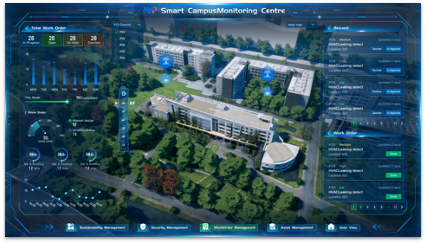
- Integration with CMMS enables automatic work order creation when sensors detect anomalies
Predictive maintenance promises to catch equipment failures before they happen. IoT sensors make that promise achievable—but implementation matters more than technology selection.
This guide walks through practical IoT sensor deployment for facility maintenance teams, from sensor selection to CMMS integration.
The Business Case for IoT Sensors
The math is straightforward:
Reactive maintenance cost: Emergency repair + downtime + expedited parts + overtime labor
Preventive maintenance cost: Scheduled service at fixed intervals (often too early or too late)
Predictive maintenance cost: Service only when sensor data indicates degradation
Studies show predictive maintenance reduces:
- Unplanned downtime by 30-50%
- Maintenance costs by 10-40%
- Equipment failures by 70-75%
The catch? You need sensors, connectivity, and integration to make it work.
Sensor Types for Facility Maintenance
Vibration Sensors
Best for: Rotating equipment—motors, pumps, fans, compressors, generators
What they detect:
- Bearing wear (increasing vibration amplitude)
- Imbalance (specific frequency patterns)
- Misalignment (directional vibration)
- Looseness (irregular patterns)
Placement: Mount on bearing housings or motor frames. Ensure solid contact—loose mounting gives false readings.
Alert thresholds: Establish baseline during normal operation. Alert when readings exceed baseline by 50-100%.
Cost range: $100-400 per sensor
Temperature Sensors
Best for: Electrical systems, bearings, HVAC equipment, motors
What they detect:
- Overloaded circuits (rising temperature)
- Bearing failure (friction heat)
- Insulation breakdown (hot spots)
- Refrigerant issues (abnormal temps)
Placement: On bearing surfaces, near electrical connections, on motor housings, in electrical panels.
Alert thresholds: Set based on equipment ratings. Typical alerts at 80% of maximum rated temperature.
Cost range: $50-200 per sensor
Current/Power Sensors
Best for: Electric motors, pumps, HVAC equipment
What they detect:
- Motor degradation (increasing current draw)
- Mechanical load changes (power anomalies)
- Phase imbalance (electrical issues)
- Efficiency loss (power factor changes)
Placement: On power feeds to monitored equipment. May require electrician for installation.
Alert thresholds: Alert when current exceeds nameplate rating or deviates from baseline by 15-20%.
Cost range: $100-300 per sensor
Environmental Sensors
Best for: HVAC monitoring, indoor air quality, critical spaces
What they measure:
- Temperature and humidity
- CO2 levels
- Differential pressure
- Air quality (particulates)
Placement: At return air ducts (system performance), in occupied spaces (comfort), in critical areas (server rooms, labs).
Alert thresholds: Based on ASHRAE standards and space requirements.
Cost range: $50-200 per sensor
Leak Detection Sensors
Best for: Mechanical rooms, water heaters, under sinks, data centers
What they detect:
- Water presence on floors
- Condensate overflow
- Pipe leaks
- Flooding conditions
Placement: Low points where water would collect, under equipment prone to leaks.
Alert thresholds: Any water detection triggers immediate alert.
Cost range: $30-100 per sensor
Connectivity Options
LoRaWAN
Best for: Large facilities, multi-building campuses, rural locations
Advantages:
- Long range (2-10 km)
- Low power (battery life 5-10 years)
- Penetrates walls and floors well
- Low cost per sensor
Requirements: LoRaWAN gateway on-site, cloud or on-premise network server
Cost: Gateway $200-1,000, sensor modules $30-100
WiFi
Best for: Office environments with existing robust WiFi
Advantages:
- Uses existing infrastructure
- High bandwidth for data-rich sensors
- Familiar technology
Disadvantages:
- Limited range
- Poor penetration in industrial environments
- Higher power consumption
- Security considerations
Cost: WiFi sensors $50-300
Cellular (LTE-M/NB-IoT)
Best for: Remote locations, facilities without network infrastructure
Advantages:
- No local infrastructure required
- Works anywhere with cellular coverage
- Good for isolated assets
Disadvantages:
- Ongoing cellular data costs
- May have coverage gaps indoors
Cost: Cellular sensors $100-400, plus monthly data fees
Recommendation
For most facility deployments, LoRaWAN offers the best combination of range, battery life, and cost. A single gateway can cover an entire building or campus, and sensors last years without battery replacement.
Download the Full Report
Get 100+ data points, verifiable sources, and actionable frameworks in a single PDF.
Get the ReportSee It In Action
Watch how facilities teams achieve 75% less unplanned downtime with Infodeck.
Book a DemoImplementation Roadmap
Phase 1: Identify Critical Assets (Week 1-2)
Not every piece of equipment needs sensors. Focus on:
High criticality:
- Safety systems (fire pumps, emergency generators)
- Production-critical equipment
- Equipment with high failure consequences
High failure cost:
- Expensive to repair
- Long lead time for parts
- Causes significant downtime
Predictable failure modes:
- Rotating equipment (vibration patterns)
- Equipment with known wear items
- Systems with temperature-related failures
Create a prioritized list of 10-20 assets for initial deployment.
Phase 2: Select Sensors and Connectivity (Week 2-3)
For each asset, determine:
- What failure modes to monitor
- Which sensor types address those modes
- Optimal sensor placement
- Connectivity requirements
Map out gateway placement if using LoRaWAN—typically one per building or floor depending on construction.
Phase 3: Baseline Data Collection (Week 3-6)
Install sensors and collect data for 2-4 weeks before setting alerts.
Why baseline matters:
- Equipment has normal variation
- External factors affect readings (weather, load)
- Alert thresholds need to be calibrated to your specific assets
Run equipment through normal operating conditions during this period.
Phase 4: Configure Alerts and Integration (Week 6-8)
Based on baseline data, set:
Warning thresholds: Elevated readings that warrant monitoring (email notification)
Critical thresholds: Readings indicating imminent failure (immediate alert + auto work order)
Integration points:
- CMMS API for work order creation
- Dashboard for real-time monitoring
- Notification channels (SMS, email, app)
Phase 5: Continuous Improvement (Ongoing)
Weekly: Review alert accuracy—too many false positives? Adjust thresholds.
Monthly: Correlate sensor data with actual failures—did sensors predict them?
Quarterly: Evaluate expansion to additional assets based on ROI.
CMMS Integration
The real value of IoT sensors comes from integration with your maintenance workflow.
Automatic Work Order Creation
Configure rules:
When: Vibration sensor on AHU-01 exceeds 8mm/s Then: Create high-priority work order: “AHU-01 vibration anomaly detected—inspect bearings” Assign: HVAC team Include: Link to sensor dashboard, historical readings, asset maintenance history
Contextual Information
Work orders generated from sensor alerts should include:
- Current sensor readings
- Historical trend showing degradation
- Similar past issues and resolutions
- Relevant documentation
Feedback Loop
When technicians resolve sensor-generated work orders:
- Was the alert accurate?
- What was actually wrong?
- Should thresholds be adjusted?
This data improves prediction accuracy over time.
Cost-Benefit Analysis
Sample Deployment: 50 Sensors
Initial Costs:
| Item | Cost |
|---|---|
| Vibration sensors (20) | $6,000 |
| Temperature sensors (15) | $2,250 |
| Environmental sensors (10) | $1,500 |
| Leak sensors (5) | $400 |
| LoRaWAN gateway (2) | $1,000 |
| Installation labor | $3,000 |
| Total Initial | $14,150 |
Ongoing Costs:
| Item | Annual Cost |
|---|---|
| Platform subscription | $3,600 |
| Battery replacements | $500 |
| Total Annual | $4,100 |
Expected Benefits
Avoided emergency repairs: If sensors prevent 3 emergency HVAC callouts per year at $2,000 each = $6,000
Reduced downtime: If sensors prevent 2 major failures causing 8 hours downtime each at $500/hour = $8,000
Extended equipment life: If predictive maintenance extends asset life by 2 years on a $50,000 asset = $5,000/year equivalent
Total annual benefit: $19,000+
ROI: First-year payback with ongoing positive returns
Common Implementation Mistakes
1. Starting Too Big
Deploying 500 sensors across an entire portfolio before proving value on 20 assets.
Better approach: Start with 10-20 critical assets. Prove ROI. Expand based on results.
2. Ignoring Baseline Period
Setting arbitrary thresholds without understanding normal equipment behavior.
Better approach: Collect 2-4 weeks of baseline data before configuring alerts.
3. Alert Fatigue
Setting thresholds too sensitive, generating dozens of daily alerts that get ignored.
Better approach: Tune thresholds to minimize false positives. Every alert should warrant action.
4. No Integration
Sensors feed a dashboard that nobody watches. No connection to maintenance workflow.
Better approach: Integrate sensors with CMMS for automatic work order creation.
5. Missing the Human Element
Relying entirely on sensors without technician input on equipment condition.
Better approach: Sensors augment—not replace—technician observations and expertise.
The Bottom Line
IoT sensors for predictive maintenance aren’t science fiction—they’re proven technology that most facility teams can implement with modest investment.
Start with critical assets where failure costs are high. Choose appropriate sensors for the failure modes you’re monitoring. Integrate with your CMMS so insights drive action.
The facilities that master predictive maintenance will operate with less downtime, lower costs, and fewer emergencies than those stuck in reactive mode.
Ready to implement IoT-based predictive maintenance? See how Infodeck’s IoT platform connects sensors to your CMMS with native LoRaWAN support, automatic work order creation, and real-time monitoring dashboards.


